
Compressed Air Flowmeter Overview and Options


EXAIR Digital Flowmeters can be an important part of your compressed air system for optimization.  Flow is a measurement that is directly related to your cost for operation; and, it can help in determining efficiency, leak rates and the overall “health” of your pneumatic system.  Th Digital Flowmeters are easy-to-read, easy-to-install, and easy-to-record devices.  You will not have to disrupt your piping system with cutting, welding, or dismantling for installation.  In this blog, I will share some product information and options that work with the EXAIR Digital Flowmeters.

The EXAIR Digital Flowmeter is a thermal dispersion device that can accurately measure compressed air flows.  They use two sensing probes for comparative analysis.  One probe is a temperature sensing probe, and the other is a flow-sensing probe. By comparing these, the Digital Flowmeter can measure accurately even in low flow regions.  Also, they do not need to be re calibrated.  They are CE and RoHS certified., and they do not have any moving part to wear.  The EXAIR Digital Flowmeters are a cost-effective, simple way to measure compressed air flows.

To get started, I will go over the design of the Digital Flowmeter.  The two sensing probes as discussed above will have to be installed in the air stream.  This is done with the Drill Guide Kit.  This kit includes a guide to properly locate the two holes in the pipe and a drill bit for the correct clearance.  The Digital Flowmeter uses a clamp design to mount onto the pipe and to seal the area around the probes.  Once it is powered, the unit is ready to measure the air flow inside the pipe with a large LED display.  The display can be customized to show flow readings in three different units; SCFM, M3/hr or M3/min.  It can also display Daily Usage and Cumulative Usage. Overall, it only takes a few minutes to install and start using.

EXAIR stocks a large volume of Digital Flowmeters to ship same day.  We also offer a 30-day unconditional guarantee for domestic and Canadian customers to try them out.  The ranges that we stock are for pipe diameters from ½” NPT to 4” NPT Schedule 40 black pipe.  For non-stocked items, EXAIR can go as large as 8” NPT Schedule 40 black pipe.  We can also get Digital Flowmeters to use with copper pipes from 3/4” to 4” sizes, and to use with aluminum pipes with the O.D. ranging from 40mm to 101mm.  If you use other types of piping for your compressed air system, you can give us the material, outside diameter/inside diameter, and the wall thickness.  We may still be able to get a Digital Flowmeter for you to use.

What sets our Digital Flowmeters apart from other types are the features and benefits.  All of the units come standard with a 4 – 20mA analog output.  We can also offer this signal as a serial output per your request for RS-485 or Ethernet connections.  The maximum pressure for the units is 200 PSIG (13.8 Bar), but we have a high pressure option to go as high as 600 PSIG (41 Bar).  If your Digital Flowmeter needs better protection for splash resistance, we can also offer units with a NEMA 4 (IP66) rating.

What more can we offer with the EXAIR Digital Flowmeter?  Options.  Options upgrade the flow meters to better suit your application.  Here is a list below.
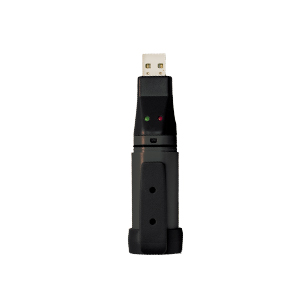
USB Data Logger: This option allows for a record of the flow information.  With a software download, you can setup the USB Data Logger to record the flows from once a second (roughly 9 hours of storage) to every 12 hours.  Once the unit has been configured, you just plug in the unit into the Digital Flowmeter and let it record the data points.  You can then upload the information into the software program to review.  It also has the ability to transfer the information into an Excel program to do further analysis.

Summing Remote:  With compressed air piping running along the ceiling and walls, it may be difficult to see the Digital Flowmeter.  The Summing Remote has a 50-foot (15 meter) cable to bring the flow measurements from the Digital Flowmeter for viewing.  The Summing Remote is powered by the Digital Flowmeter, and it can also show the daily and cumulative readings.  They can be positioned at eye level near stations, inside managers’ rooms, or around large equipment for monitoring.

Hot Tap:  This option is for Digital Flowmeters that are 2” and larger for steel and copper pipes.  It gives a quick and easy way to attach the Digital Flowmeter to the pipe without shutting down the compressed air line.  If you have a 24-hour operation or a critical process that needs to run, this option would be a great way to install the EXAIR Digital Flowmeter without disturbing the system.

Pressure Sensing:  If you would like to know the compressed air flow and the air pressure on the same unit, this option is able to do this.  They are available with the Digital Flowmeters for steel and copper pipes that are 2” and larger, and for the aluminum piping that are 50mm and larger.  This option can display the pressure units in either PSI or Bar right on the LED display.

Block-Off Rings:  If you want to relocate your Digital Flowmeter, the Block-Off Rings will be able to cover the openings.  They seal around the area when the Digital Flowmeter is removed from the pipe.  They are reusable; so, they can be removed if you want to remount the Digital Flowmeter in the same spot.  Or if you want to use one flow meter in different locations, the Block-Off Rings allow you do this.

Wireless Capability:  Our latest Digital Flowmeter now has wireless capabilities.  They use a Zigbee® communications to pick up flow readings from different flow meters without running communication wires.  The Gateway is a system that can detect over 100 Digital Flowmeters located throughout your facility.  From the Gateway, the information is transferred through a LAN to your computer.  You can record and analyze the flow information from each meter on the network with our EXAIR® Logger Software.  You can set limits to send warning when your compressed air system is using too much or too little of compressed air.  This technology makes it very easy for measuring your compressed air system in different areas without having to be there.

When you need to analyze your pneumatic components, flow is an important point in diagnosing the overall “health” of your compressed air system.  The EXAIR Digital Flowmeter can give you that important data point.  With this overview, you may have additional questions and that is great.  An Application Engineer at EXAIR is here to help.  We can support you in determining the product and options that will work best for you.

John Ball
Application Engineer
Email: johnball@exair.com

Twitter: @EXAIR_jb

Six Steps To Optimizing Your Compressed Air System – Step 1: Measure

“To measure is to know – if you cannot measure it, you cannot improve it.”
-Lord Kelvin, mathematical physicist, engineer,and pioneer in the field of thermodynamics.

This is true of most anything. If you want to lose weight, you’re going to need a good scale. If you want to improve your time in the 100 yard dash, you’re going to need a good stopwatch. And if you want to decrease compressed air consumption, you’ll need a good flowmeter. In fact, this is the first of six steps that we can use to help you optimize your compressed air system.

Six Steps To Optimizing Your Compressed Air System

There are various methods of measuring fluid flow, but the most popular for compressed air is thermal mass air flow.  This has the distinct advantage of accurate and instantaneous measurement of MASS flow rate…which is important, because measuring VOLUMETRIC flow rate would need to be corrected for pressure in order to determine the true compressed air consumption.  My colleague John Ball explains this in detail in a most excellent blog on Actual (volume) Vs. Standard (mass) Flows.

So, now we know how to measure the mass flow rate.  Now, what do we do with it?  Well, as in the weight loss and sprint time improvements mentioned earlier, you have to know what kind of shape you’re in right now to know how far you are from where you want to be.  Stepping on a scale, timing your run, or measuring your plant’s air flow right now is your “before” data, which represents Step One.  The next Five Steps are how you get to where you want to be (for compressed air optimization, that is – there may be a different amount of steps towards your fitness/athletic goals.)  So, compressed air-wise, EXAIR offers the following solutions for Step One:

Digital Flowmeter with wireless capability.  This is our latest offering, and it doesn’t get any simpler than this.  Imagine having a flowmeter installed in your compressed air system, and having its readings continually supplied to your computer.  You can record, analyze, manipulate, and share the data with ease.

Monitor your compressed air flow wirelessly over a ZigBee mesh network.

Digital Flowmeter with USB Data Logger.  We’ve been offering these, with great success, for almost seven years now.  The Data Logger plugs into the Digital Flowmeter and, depending on how you set it up, records the flow rate from once a second (for about nine hours of data) up to once every 12 hours (for over two years worth.)  Pull it from your Digital Flowmeter whenever you want to download the data to your computer, where you can view & save it in the software we supply, or export it directly into Microsoft Excel.

From the Digital Flowmeter, to your computer, to your screen, the USB Data Logger shows how much air you’re using…and when you’re using it!

Summing Remote Display.  This connects directly to the Digital Flowmeter and can be installed up to 50 feet away.  At the push of a button, you can change the reading from actual current air consumption to usage for the last 24 hours, or total cumulative usage.  It’s powered directly from the Digital Flowmeter, so you don’t even need an electrical outlet nearby.

Monitor compressed air consumption from a convenient location, as well as last 24 hours usage and cumulative usage.

Digital Flowmeter.  As a stand-alone product, it’ll show you actual current air consumption, and the display can also be manipulated to show daily or cumulative usage. It has milliamp & pulse outputs, as well as a Serial Communication option, if you can work with any of those to get your data where you want it.

With any of the above options, or stand-alone, EXAIR’s Digital Flowmeter is your best option for Step One to optimize your compressed air system.

Stay tuned for more information on the other five steps.  If you just can’t wait, though, you can always give me a call.  I can talk about compressed air efficiency all day long, and sometimes, I do!


Monitor Your Compressed Air System With EXAIR’s Digital Flowmeters

A topic that we’ve talked about here on the EXAIR blog discusses the costs of compressed air and how to use it more efficiently. How can you determine the costs of your compressed air? The first step you’ll need to take is to quantify the flow. In order to do that you’ll need a measurement tool such as the EXAIR Digital Flowmeter.

dfm_sizes
EXAIR’s family of Digital Flowmeters

The Digital Flowmeter is available from stock for use on Schedule 40 pipe with sizes ranging from ½”-4” I.D. Sizes up to 6” for Schedule 40 and ¾”-4” for copper pipe are also available. With a digital readout display, it’s easy to accurately monitor your compressed air usage throughout the facility. Creating a baseline of your usage will allow you to understand your compressed air demand, identify costly leaks, and replace inefficient air products.

The Digital Flowmeter installs in minutes with help from a drill guide and locating fixture to assist in mounting the Digital Flowmeter to the pipe. Two flow sensing probes are inserted into the drilled holes in the pipe. The meter then seals to the pipe once tightened. There is no need to cut, weld, or do any calibration once it is installed. With blocking rings also available, installation can be permanent or temporary.

The newest addition to this product line is the Digital Flowmeter with wireless capability. Using a ZigBee® mesh network protocol, data is transmitted to an Ethernet connected gateway. This allows you to mount the Digital Flowmeter in areas that you may not be able to easily access and wirelessly monitor and graph the usage with the EXAIR Logger software. Take a peek at this video blog for a demonstration of the use of a wireless Digital Flowmeter software to compare an open pipe to an engineered Air Nozzle.

wirelessdfmpr2_1670x574

In addition to communicating wirelessly with the gateway, the Digital Flowmeters can “piggyback” off of each other to extend their range. Each meter has a range of 100’. Using multiple Digital Flowmeters within the same ZigBee® mesh network, data can be passed from meter to meter to extend the distance over which the meters can operate. These can be installed on each major leg of your compressed air system to continuously monitor usage throughout the facility.

If you’d rather go with a hard-wired data collection method, the Digital Flowmeter is also available with a USB Data Logger. Simply remove the Data Logger from the Digital Flowmeter and connect it to the USB port of your computer. The data can then be viewed directly in the accompanying software or exported into Microsoft Excel.

dataloggerPRce_559wide
Digital Flowmeter w/ USB Data Logger installed

If you’d like to get a clear view of your compressed air usage, give us a call. An Application Engineer will be happy to work with you and get the proper Digital Flowmeters installed in your facility!

Tyler Daniel
Application Engineer
E-mail: TylerDaniel@exair.com
Twitter: @EXAIR_TD

Digital Flowmeter Improves Production Scheduling And Upgrade Budgeting

“You can’t manage what you can’t measure” might be the most popular axiom in any process improvement endeavor. And it’s true. We hear it almost every time we discuss a Digital Flowmeter application, and a conversation I just had with a customer was no exception.

Their business is growing, and they’re pushing the limits of their compressed air system. The use compressed air to run their CNC mills in their machine shop, for blow off/cleaning as they assemble products, as well as a variety of pneumatic tools throughout the shop. The CNC machines’ air load was pretty consistent…the rest of the shop; not so much. So they wanted to find out when their compressed air demand peaked, and what it peaked at, in order to make a more informed decision about upgrading their compressor.

From your Digital Flowmeter to your computer screen, the USB Data Logger tells you how much air you’re using…and when you’re using it!

So, they purchased a Model 9095-DAT Digital Flowmeter for 2″ SCH40 Pipe, with USB Data Logger. They installed it immediately, with the USB Data Logger set to record once a second…this told them their consumption at any given time over the course of the day. Every day at closing time, the shop manager pulls the USB Data Logger from the Digital Flowmeter and transfers the data to his computer. After just a few days, he knew exactly how much air they were using…and exactly when they were using it. He’s now using this data (in the short term) to plan certain operations around peak scheduling, and (in the long term) to know what they’re looking at for their next air compressor.

Do you know as much about your compressed air usage as you should? If you’d like to talk about how to measure…and manage…your air consumption, give me a call.

Russ Bowman
Application Engineer
Find us on the Web
Follow me on Twitter
Like us on Facebook