Models – Childhood vs. Modern World

When I use the term models, I am often taken back to the plastic models I would build as a kid. The models I always focused on were classic muscle cars and some World-War 2-era aircraft. There was always something about my dad helping me with them and really deep in my mind I felt like I was building a real car. Well, like most things, the term models have changed. While there are still plastic models found, the hobby shops have dwindled in numbers and a lot of models now refer to computer-aided drawing, or CAD for short, another acronym just like I talked about last week.

Organized Chaos. As an adult, I get a slight bit of anxiety about this picture. At the same time, it brings back that feeling of looking for just the right model and having one catch my eye that I wasn’t expecting.

CAD models have really simplified the design and implementation process for anything, even buying furniture for your home. You can use free CAD software to lay out your room and render the environment. In industrial environments, a CAD model can really give the full picture of how the products will fit, what kind of mounting will be needed, and help to design the plumbing or wiring that will be needed to get to the new component. Some models even let you test the functionality or see the coverage of spray / air patterns. This gives yet another method of validation before money is spent on procuring a product for physical testing.

The best part of this is that EXAIR has an entire CAD catalog that spans across all EXAIR products and these models can be downloaded in dozens of different formats to align well with the software being used in order to meet you, our customers where they are, rather than having to conform to what we use. These EXAIR CAD downloads are accurate and extremely helpful to use as a talking point and the Application Engineers here can help you improve the implementation of our products before you even get them, so it minimizes the amount of time it takes you to install the product once it is on site. We can also talk with you how to correctly position the products and validate the placement of our products in order to best serve the application at hand.

This may not be the finished model but I am pretty sure this was the exact kit I started with over 30 years ago.

These CAD models won’t permit you to 3D print a functional product. They will, however, let you 3D print a placeholder for the product that could be physically manipulated if you need to physically validate it before purchasing. While these models aren’t quite the same as that 1968 Chey Comaro SS that I built with my dad way back when it is probably still in a box in the closet at my parents’ house, they are helpful and can give you an assurance of how the EXAIR item is going to fit. After all, assurance and validation is what a lot of building those models really was about now that I think about it.

If you need help with CAD models of EXAIR products, for some odd reason you can’t find the exact model you are looking for, that’s what our Application Engineering team is here to help with. So contact us.

Brian Farno, MBA – CCASS Application Engineer

BrianFarno@EXAIR.com
@EXAIR_BF

Draw Me A Picture

Here at EXAIR it has been said and said again, a picture is worth 1,000 words. This also doubles up on my favorite saying, you can’t teach experience. While I have been with EXAIR for nearly 14 years and in the metal cutting industry for 5 before that, then a student, before that, our other AE’s have diverse backgrounds as well. I grew up around cars and a family that was ingrained in a steel mill and many aspects of it, so seeing a multitude of processes is something I have done since I was little.

When I was a student in Mechanical Engineering Technology I would always try to get into the courses where I would learn more process and critical thinking focus. This led me to many factory visits and case studies where I got to sample many different aspects of many industries. How else am I supposed to know what I want to do when I grow up? Well, working here in the Application Engineer department, I draw on that knowledge and experience nearly every single day. Just this morning, I asked a customer to do a simple sketch of what their system layout would look like, so I could fully understand everything they were going to have in place for a new setup they wanted to try and were concerned with operating pressures/restrictions on their piping.

Now this sketch is quite elaborate from the amount of information it provides. The best part is, all these parts are critical pieces of information. It is also still missing some key parts of information, such as all the distances between system parts. Those items were all discussed and the longest run of the line was going to be the 3 feet of air piping shown. 

The customer and I then began to discuss all the size changes in the supply inlet to the system and how not only were the needle valves undersized, which they noted, but the entire piping seemed undersized and going to be an issue to really be able to operate anywhere near line pressure.

At the end of the conversation with the customer, we settled on using a 3/4″ Schedule 40 piping or equivalent, changing out their PRV-1 for a 3/4″ version as well as their filter. Then running that larger line size all the way to the needle valves. I strongly advised them to increase the needle valve sizes as well. We know the valves won’t feed the knives with enough volume as they noted in the sketch and 10 psig is a significant drop. At the same time, the application of keeping some lightweight debris off a surface as a final blowoff isn’t going to demand a full-line pressure blowoff. We also discussed that they could look into reducing the shim in the Super Air Knives like they did in the Air Amplifiers to reduce consumption and to be able to operate at a higher pressure if needed.

Sketches don’t have to be this detailed, it always helps, and the actual pictures are always great too. The point is that we will probably always ask more questions and the result will always be an answer that we feel confident in. We can often back up our selections with scientific data like flow through piping tables and equations for consumption at varying pressures.

If you have a new or existing setup that you would like to discuss with an Application Engineer to determine if it has a high success chance or not, reach out to us!

Brian Farno
Application Engineer
BrianFarno@EXAIR.com
@EXAIR_BF

Common Compressed Air Symbols

When any product / system is designed drawings are made to assist in the production of the designed product. For example if a mechanical part is being machined you may see symbols like these to verify the part is made correctly:

GD&T
GD&T Symbol Examples

Same with an electrical panel, they use symbols like the ones below to note the type of equipment used in a location.

electronic.JPG
Electrical Symbol Examples


Then there’s the Piping & Instrumentation Diagram (P&ID)…it depicts an overall view of a system, showing the flow (usually fluid or electricity) through that system’s components, giving the viewer an understanding of the operation, and expected results from said operation.

Some examples of symbols you might find in a compressed air system are:

Compressors:

all-compressor
The one on the left can be used for any air compressor. The others denote specific types of air compressor (from left:) Centrifugal, Diaphragm, Piston, Rotary, and Screw.


Air preparation & handling:

filters-and-regulator-symbols-and-pic.jpg
The symbols on the left denote the EXAIR products on the right: Automatic Drain Filter Separator, Oil Removal Filter, and Pressure Regulator

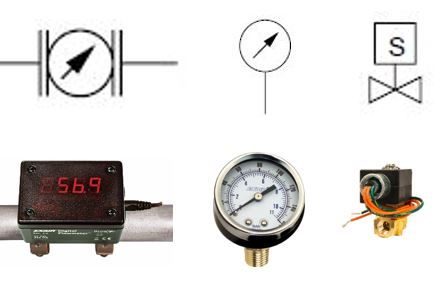
Instrumentation and control:

instrumentation-and-controls1.jpg
The symbols on top denote the EXAIR products below (left to right): Flowmeter, Pressure Gauge, and Solenoid Valve

Occasionally, we’re asked if there are standard ANSI or ISO symbols for any of our  engineered Intelligent Compressed Air Products…and there aren’t.  Perhaps one day they might make the cut, but for now, their standard convention is to choose a shape and call it out by name.  It might look something like this:

sak-pid1
From top left, and then down: Automatic Drain Filter Separator, Oil Removal Filter, Pressure Regulator, and Super Air Knife

If you have questions about any of the quiet EXAIR Intelligent Compressed Air® Products, feel free to contact EXAIR and myself or one of our Application Engineers can help you determine the best solution.

Jordan Shouse
Application Engineer
Send me an email
Find us on the Web 
Like us on Facebook
Twitter: @EXAIR_JS

Knowing Your Symbols Is Key To Understanding Your Drawings

There are all kinds of engineering drawings, used for all kinds of purposes:

  • Pipe fitters and millwrights use Plan & Elevation drawings to make sure fluid system flanges, elbows, tees, etc., line up with each other, and don’t run into anything.
  • Exploded view drawings help maintenance folks identify parts, and, when they need replaced, make sure the new ones go in the same way the old ones came out.
  • Fabrication and machining drawings (usually to scale) are used to ensure the part being made is the right size & shape, that mounting holes are in the right place, and that critical surfaces are as flat & smooth as they need to be.
  • Then there’s the Piping & Instrumentation Diagram (P&ID)…it depicts an overall view of a system, showing the flow (usually fluid or electricity) through that system’s components, giving the viewer an understanding of the operation, and expected results from said operation.  It should not be confused with its simpler cousin, the flow chart that is so dreaded by OTE-types (“Other Than Engineer”…you know who you are,) of which these are my favorite examples:

There’s a lot of “life lesson” in these two graphics.

The big difference between a flow chart and a P&ID is the symbols.  In fact, you can find ISO & ANSI standard symbols for many components you’ll find in fluid & electrical P&ID’s.  Some examples of symbols you might find in a compressed air system are:

Compressors:

The one on the left can be used for any air compressor. The others denote specific types of air compressor (from left:) Centrifugal, Diaphragm, Piston, Rotary, and Screw.

Air preparation & handling:

The symbols on the left denote the EXAIR products on the right: Automatic Drain Filter Separator, Oil Removal Filter, and Pressure Regulator

Instrumentation and control:

The symbols on top denote the EXAIR products below (left to right): Flowmeter, Pressure Gauge, and Solenoid Valve

Occasionally, we’re asked if there are standard ANSI or ISO symbols for any of our  engineered Intelligent Compressed Air Products…and there aren’t.  Perhaps one day they might make the cut, but for now, their standard convention is to choose a shape (user preference…you’re the one it’s gotta make sense to) and call it out by name.  It might look something like this:

From top left, and then down: Automatic Drain Filter Separator, Oil Removal Filter, Pressure Regulator, and Super Air Knife

Oh, and if you’ve ever got any questions about your compressed air system that you think looking at a drawing together could help us solve, you can send that drawing to us at techelp@exair.com, and one of us will be happy to help.

Russ Bowman
Application Engineer
EXAIR Corporation
Visit us on the Web
Follow me on Twitter
Like us on Facebook